
Simplify Dining.
Scale Your Restaurant
Operations.
The all-in-one operating platform for modern restaurants — live table management, instant kitchen-confirmed QR ordering, and smart reservations from one screen.
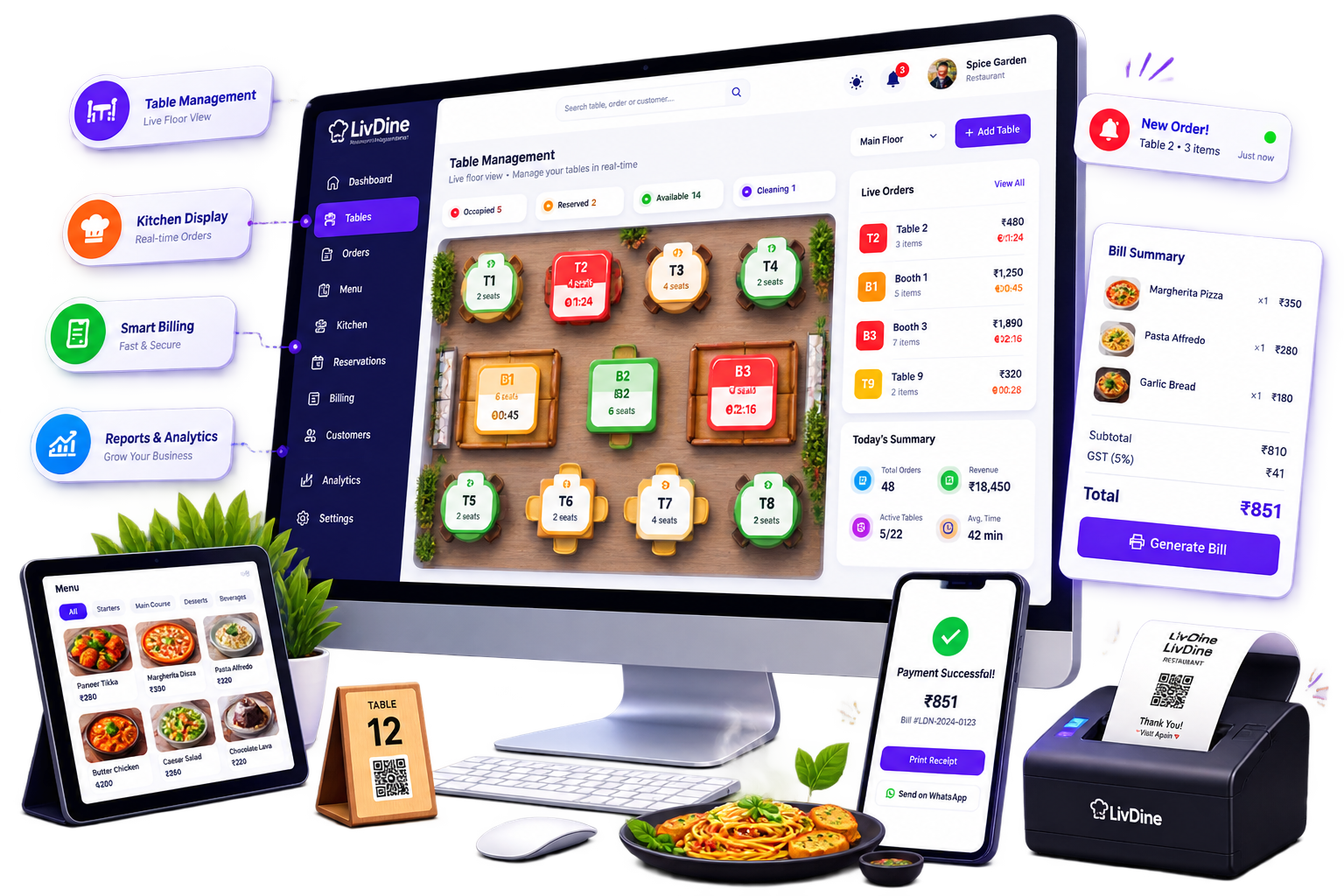
Built around your floor, your kitchen, and your guests
LivDine isn't a bolted-together POS. It's one system where a table, an order, a chef, and a bill all point to the same source of truth.
For the owner
One dashboard for revenue, tax, and staff performance — pulled straight from the floor, not entered by hand.
Live revenue dashboard
Today's revenue, total orders, average order value, and active tables update as tables turn — with a sales performance chart and your top-selling items ranked automatically.
Tax & payment split, done for you
See tax collected today and the exact split between online payments and counter payments, so closing the books stops being a Sunday-night task.
Staff accounts with a switch
Add a new chef or waiter in seconds, assign their role, and flip them inactive the moment they leave — an inactive account simply can't log in.
Full session history
Every table session, every order, and which chef cooked it — searchable later for disputes, audits, or just knowing what actually happened on a busy Saturday.
For the front of house
Every table, every reservation, every guest request — tracked from the moment someone sits down to the moment they pay.
Real-time table management
See which tables are booked, who's sitting there, what they've ordered, and whether the kitchen has confirmed each item — one floor view, always current.
Reservations that assign themselves
A phoned-in reservation is matched to a table automatically, held from 30 minutes before to 30 minutes after the booking, then released — with a cancellation email sent to the guest if they don't show.
Takeaway, on its own board
Today's takeaway orders sit in a dedicated view, separate from dine-in, so parcel orders never get lost in the middle of a table rush.
Guest feedback, in one place
Every rating and comment lands in a single feed, so you know what guests actually thought — not just what they tipped.
For the kitchen
A dedicated kitchen display keeps every ticket visible, confirmed, or cancelled — with nothing shouted across a pass.
Kitchen display system
Orders from every table and every QR scan land on one screen. The chef confirms or cancels each item, and that status flows straight back to the guest.
Item-level availability
Out of an ingredient mid-service? Cancel just that item — the guest sees it cancelled instantly instead of waiting on a dish that's never coming.
For the guest
A scan replaces the wait for a waiter — while the kitchen and the bill stay perfectly in sync.
Scan-to-order via QR
Guests scan the table's QR code, add their details, and browse the live menu — no app download, no waiting to flag someone down.
Pay by Razorpay or at the counter
Guests choose how they settle up — card, UPI, or wallet through Razorpay, or the traditional counter payment — and the table clears the moment it's done.
How an order actually moves through LivDine
Four steps, one continuous thread — the same order id from the first scan to the last rupee.
- 01
Guest sits down and scans
A QR code on the table opens the live menu — or, for a phone booking, LivDine assigns a table automatically and holds it around the reservation time.
Table 7 · assigned - 02
Order goes straight to the kitchen
Items selected by the guest land on the kitchen display in seconds — no ticket printed, no order shouted across the pass.
Order #4821 · sent to kitchen - 03
Kitchen confirms, or cancels what's out
The chef marks each item confirmed or cancelled. If something's unavailable, the guest sees it cancelled on their screen immediately.
3 of 4 items confirmed - 04
Guest pays, table clears, owner sees it
Payment via Razorpay or at the counter closes the session. The table frees up on the floor view, and the sale lands on the dashboard in real time.
₹1,240 · paid via Razorpay
Priced for one outlet, ready for twenty
No per-table add-ons, no surprise fees. Every plan includes the full order lifecycle, end to end.
Starter
For a single outlet finding its feet
- Up to 15 tables
- Table & takeaway management
- Kitchen display system
- Basic dashboard & sales chart
- Email support
Growth
For restaurants running full service
- Up to 30 tables
- Everything in Starter
- QR code ordering
- Reservations with auto table-assign
- Full staff management & roles
- Session history & audit trail
- Feedback collection
- Razorpay payments
- Priority support + ticket tracking
What owners notice in the first month
“We stopped losing track of table 12 mid-Saturday. The floor view shows exactly what's ordered and whether the kitchen's confirmed it — our waiters aren't guessing anymore.”
“Reservations used to be a notebook by the phone. Now a booking assigns its own table and cancels itself if the guest never shows — no one has to remember to release it.”
“QR ordering took pressure off our floor staff during peak hours, and the kitchen display means nothing gets cooked twice or missed entirely.”
Everything you need to know
about LivDine
Answers written the way restaurant owners actually search — no marketing fluff.
LivDine is a next-generation restaurant and order management software designed for speed and simplicity. It replaces outdated, slow POS systems with a unified platform. When a customer orders via a QR code at their table, or a captain inputs an order on a tablet, it is instantly routed to the Kitchen Display System (KDS) for the chefs. Once the food is ready, the billing dashboard automatically syncs the order for a seamless, one-click checkout — completely eliminating lost tickets and manual entry errors.
LivDine was engineered with a modern tech stack focused entirely on speed and a clean User Interface. While legacy software often requires multiple clicks and page loads just to modify an order or split a bill, LivDine allows staff to execute complex billing actions in seconds. Because it is a unified system rather than a patchwork of third-party apps, data syncing between the table, kitchen, and billing counter happens instantly without lag.
The best restaurant management software must prioritize transaction speed and an intuitive user interface to handle peak rush hours. Unlike legacy systems that are slow and cluttered, modern solutions like LivDine offer a unified dashboard integrating QR ordering, live table management, and a Kitchen Display System (KDS). This ensures orders flow seamlessly from the customer's phone to the kitchen, resulting in faster table turnover and zero order bottlenecks.
When upgrading from traditional, hardware-heavy legacy POS systems, the best alternatives are lightweight platforms with modern UIs. LivDine provides a faster, crash-free experience compared to older software. By eliminating unnecessary clicks and syncing live orders directly with billing and KDS, modern POS alternatives drastically reduce staff training time and prevent server crashes during high-volume shifts.
To be considered the best restaurant POS system today, the software must go beyond simple billing. Essential features include: Integrated KDS for real-time kitchen ticket management without paper; QR Code Ordering that allows customers to order directly from their tables; a High-Speed UI that takes seconds to navigate, reducing customer wait times; and Real-time Synchronisation allowing owners to manage menus and view live sales data from anywhere. LivDine combines all these features into a single, high-speed ecosystem without requiring third-party integrations.
A standard Point of Sale (POS) system is primarily a billing tool used at the checkout counter. In contrast, comprehensive restaurant order management software handles the entire lifecycle of a meal — it captures the order via QR or captain app, routes it instantly to a Kitchen Display System (KDS), tracks the prep time, and seamlessly merges it with the final bill. LivDine unifies this entire process, ensuring no orders are lost and kitchen confusion is eliminated.
During peak restaurant hours, every second counts. A slow POS system with a complicated UI leads to longer billing lines, frustrated staff, and slower table turnover — directly costing the restaurant money. A fast, modern UI requires fewer clicks to split a bill, apply a discount, or modify an order. LivDine was engineered specifically to solve this problem, offering a hyper-responsive interface that keeps restaurant operations flowing smoothly even at maximum capacity.
Still have questions?
Talk to our teamSee LivDine running on your own floor plan
Book a 20-minute walkthrough with your actual tables, menu, and staff structure — no generic slideshow.
- Phone+91 93280 64628
- Emailswastiqtechdesigns@gmail.com
- SupportRaise & track a ticket right from your dashboard